Bears, Hugs and Static Site Generators
I have been wanting to rework my blog a bit. The existing tool I used, Eleventy, while cool and really malleable, felt a bit complicated for my taste. I have a tendency to get lost in the setup of things when I work on boring stuff (I think that it is a sort of a procrastination avoidance mechanism) and I was seeing that happen a lot with the many SSG frameworks I've tried since then. Many of them (on the JS side especially) feel like they are focusing on building these rich JS powered applications rather than simple personal websites like in the bygone days of the internet.
To deal with this and also as a learning experience for myself, I wrote up Hugs, a very simple 'bare-necessities only' static site generator with some wacky opinions!
The bears
A lot of the foundational design inspirations actually come from my exploration of Bear (thanks Riya for introducing me to it!). It is a pretty cool platform to build simple and effective personal sites with minimal fuss about setup and a lot more focus on the content. I generally love the aesthetic and the admiration for the internet and the personal pages of yore.
Another aspect of Bear I really got inspired by is how it is kinda aligned with the fact that it is mostly meant to be a place for personal sites and blogs. While you can do more fancy stuff and pages with Bear, I feel there is a very interesting resistance from the platform in terms of weird quirks and things that will nudge you (but not stop you!) into the desired thing you wanted to do, which Bear does indeed handle pretty elegantly! For those of you who just want a personal site without the fuss of hosting and setting things up, I actually highly recommend Bear. It will take you pretty far for most of your needs, and I am pretty sure you will really love the minimal quaint simplicity it provides.
Side-note: Bear's Discovery Feed is actually one of my favorite spots to read through on the internet. You should check it out too!
Setting the principles
Inspired from the Bear excursion and after taking notes on the design, I arrived at a basic primitive that works pretty well for a static site generator that can still be reasonably bent for adjacent use cases (I would love to use Hugs for any product/project sites I may make, for example). These ended up being:
Markdown only - The author exclusively deals with markdown files with Jinja templating and a YAML frontmatter as the core file — plain
.mdfiles that define the page content. The frontmatter also provides options to script things and offers interesting query capabilities.Strict Content Layout - Hugs doesn't allow you to define what your page template looks like. It is strict and built around the idea that there is a header, a nav area, a content area, and then a footer. This cannot be overridden as there is no option to even replace the base template. This seems to be the most limiting aspect of the design (still a feature in my eyes!).
Theming exists in a single folder - All the info you use for theming, primarily the stylesheet, the header, footer and content area core templates are defined in an
_folder in the base of the site folder.RSS/Atom, robots.txt, Sitemaps built-in - These are core features that are just given by default to the author without any prior setup required generally. Most personal sites will need this so this helps with that.
Be helpful - This will be elaborated on in its own section below.
Having these defined thoroughly really helped me quickly litmus test what NOT to build. This was a pretty new unlock for me in terms of thinking about product design. In the beginning stages of formulating a solution, the end goal is always very formless and distant, the framework of having the end goals in place really helps you get a compass to steer you into the right place. An SSG will always need different features, deciding what not to build is the key in the design here, at least from what I feel here.
Be helpful
If you are not familiar with Elm, I would really suggest checking it out. It is a delightful little programming language and runtime meant for web applications. While the community and the project seem to have stagnated, which is a sad state of affairs, I think a lot of software and language design aesthetics could be learnt from it. One (of the many) aspects of Elm I really love is how amazing their error messages are:
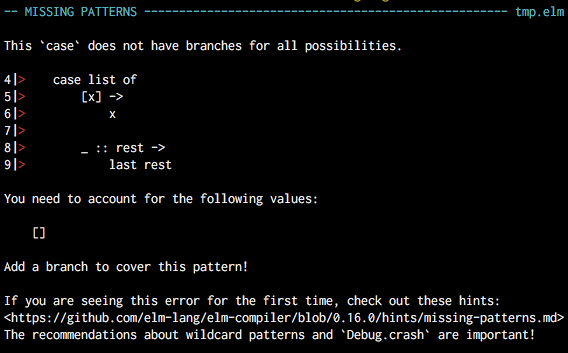
It is truly one of the best in the business and serves as an inspiration for many other programming languages to aim for. Here is a good read about the rationale here: Compilers as Assistants
Hugs tries to follow the same mantra as well, to start with, every blurb in the command output tries to explain what it is going to do in simple inviting terms.
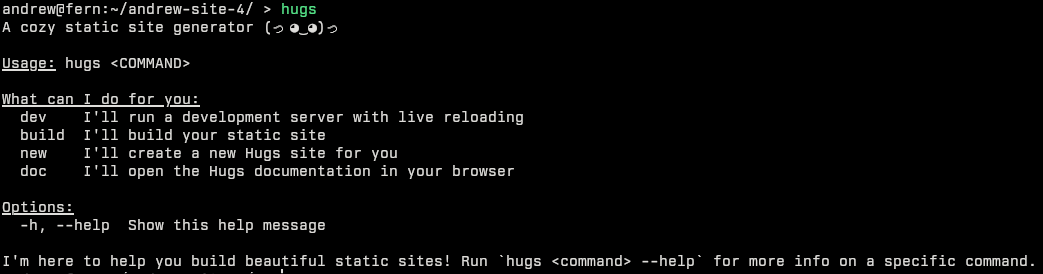
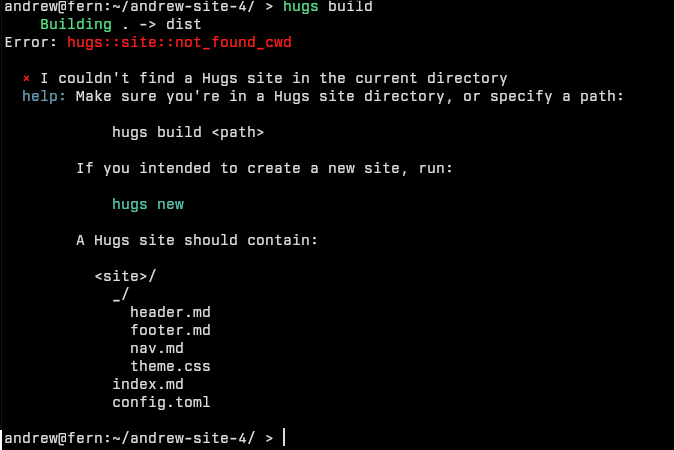
More importantly, we try to express errors as cleanly as possible and guide the user into the right trajectory:
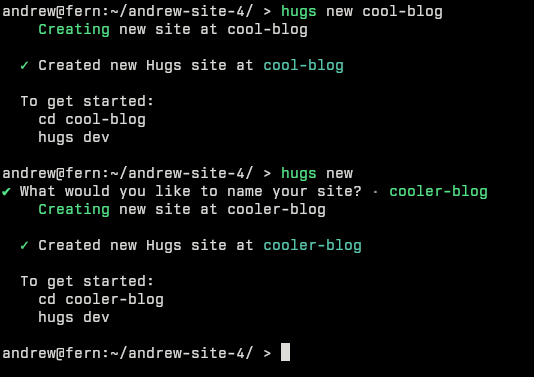
During some internal testing with friends, I observed that users, particularly for hugs new, tend to not supply args. They then need to stumble into the error message and need to work things out. So, I also peppered in interactive prompts as fallback in some cases as well:
A key I have found across building these experiences has been the fact that error messages need to be informative of what went wrong and give the user context on it, and where possible, nothing beats giving the user as clear as possible information on how to get on and fix the issue.
I like the first person perspective that Elm's compiler takes and I have imbued that into Hugs' error messages as well, while it initially felt a bit corny, there is some kind of warmth that comes from it that is very cozy feeling.
The harder errors
The command line errors are very simple to think about and fix because the possibility space is still pretty minimal. The scripting and templating part of the engine is the more complex part and also the part where I expect the users to stumble a lot more. Hugs uses Jinja (via minijinja) as the way to template and it provides a pretty flexible way to query and deal with data and formatting. I put in some elbow grease into making sure templating errors get the same treatment. When you make a mistake in Hugs while templating, it will look like this in the browser:
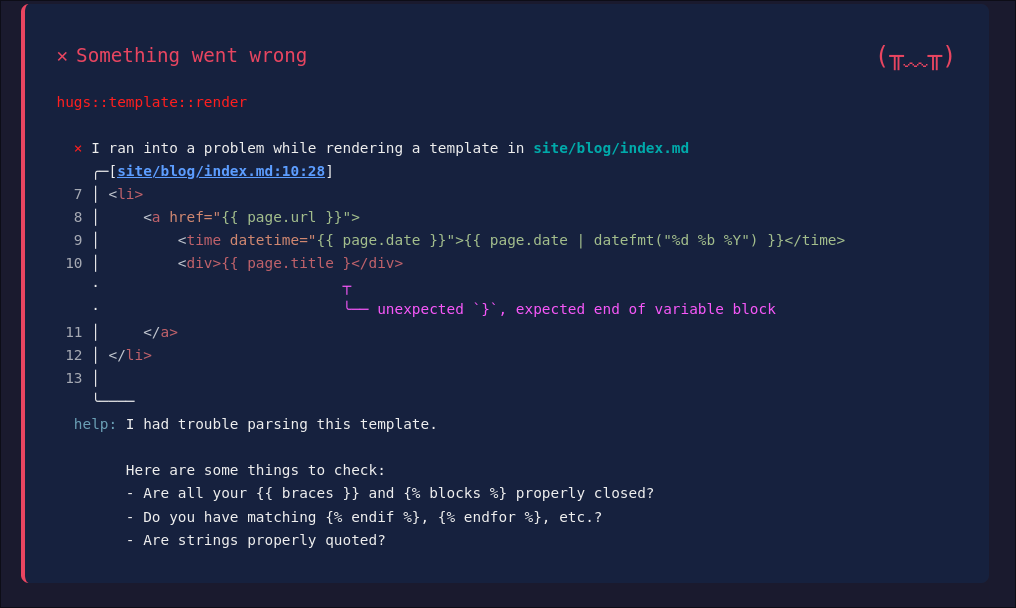
The same objectives as mentioned with the command line args are still present here, even more so:
A lot of care is given to showcasing the context of the issue — showing the code snippet with the error really helps draw attention to where the error actually is, with special highlight for the region that produced it. Something I see when I script (especially at late nights!) is how I lose the spatial reasoning for where the issue actually happened, so having it pointed out with the snippet itself helps find those one-off issues really well and combat these kinds of selective blindness issues.
The nudge into what to look out for to correct the issue is also pretty well defined. For these specific class of errors, I would love to someday be able to give even more specific and stronger error messages, but that would need parser level machinery to achieve it. Someday, I may get around to a 'helpful' Jinja parser maybe (^ _ ^). Until then, we have an error message that captures most of the Jinja templating issues as cleanly as possible.
I have tried to fit this into some functions in Hugs that are specifically custom as well, for example, datefmt is a filter that Hugs introduces to be able to format dates and times to a given format. To be able to parse the date, it needs the value to be in a specific format, so we give this error:
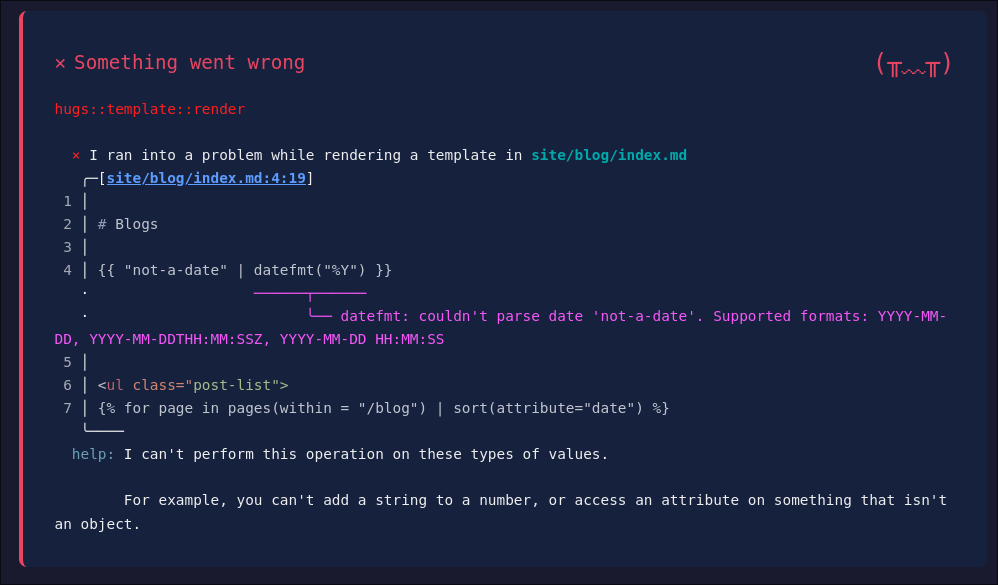
We tell specifically that datefmt cannot deal with the given value (we can also see the value that datefmt was given to set context). I think we can get better error messages if we can get the custom parser going, but with what we have now, we still try as much as possible.
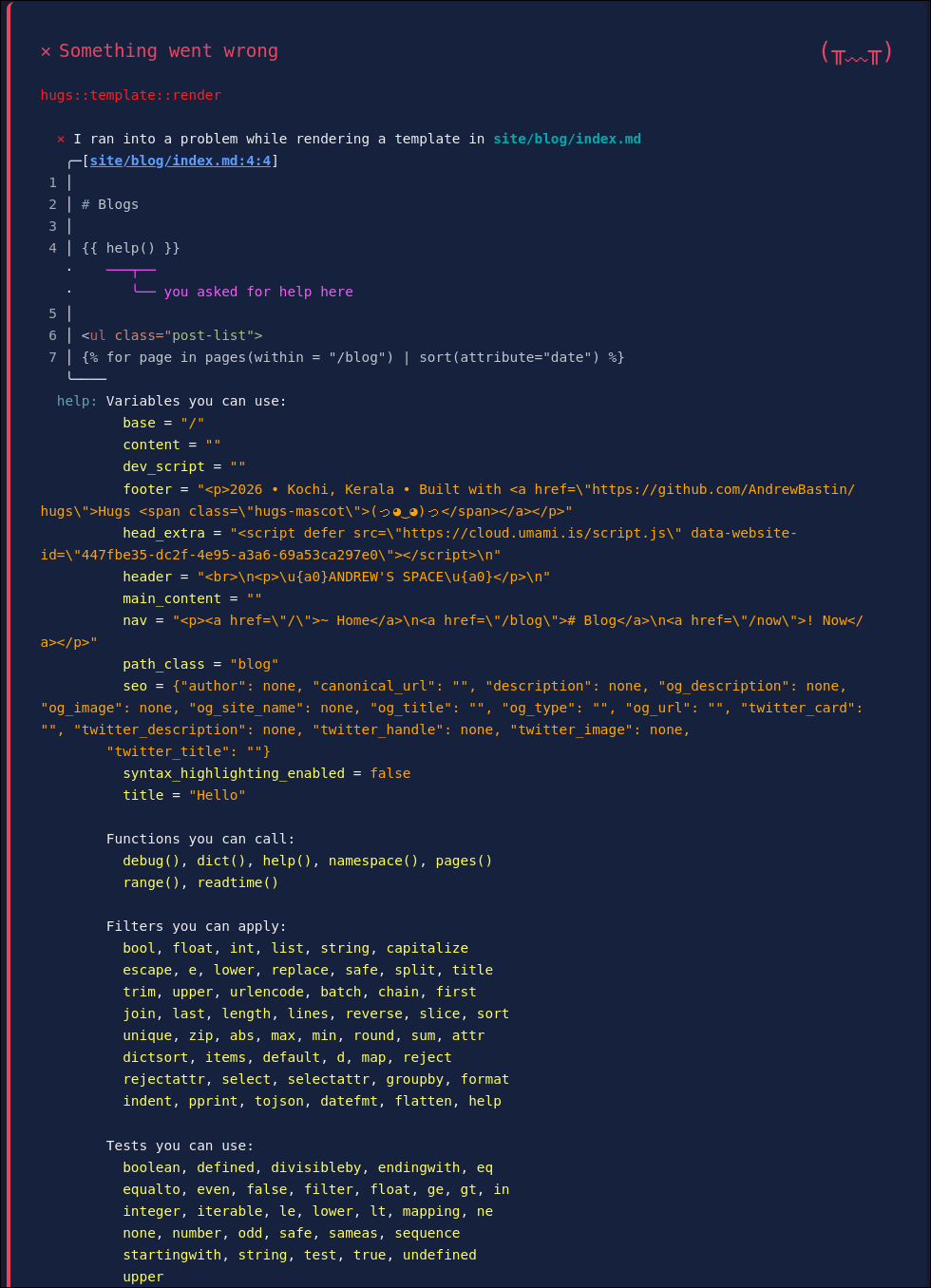
There are plenty of messages for all sorts of nudges and to give more info into what is happening in templating, you can also just use the help function to observe the entire context which is pretty helpful.
How to teach ?
While these errors and prompts help the user figure out their issues, this doesn't teach the user what is Hugs and what it can do. So I looked into adding in-built docs into Hugs and that actually works out pretty well. The documentation site also serves as the starter template for the site created when you run hugs new, which works out as a really good starting point to rub off some knowledge of the framework and the way Hugs works. Clearing stuff off and starting fresh still doesn't take much time, so it's still not much of a bother to remove the documentation bits. 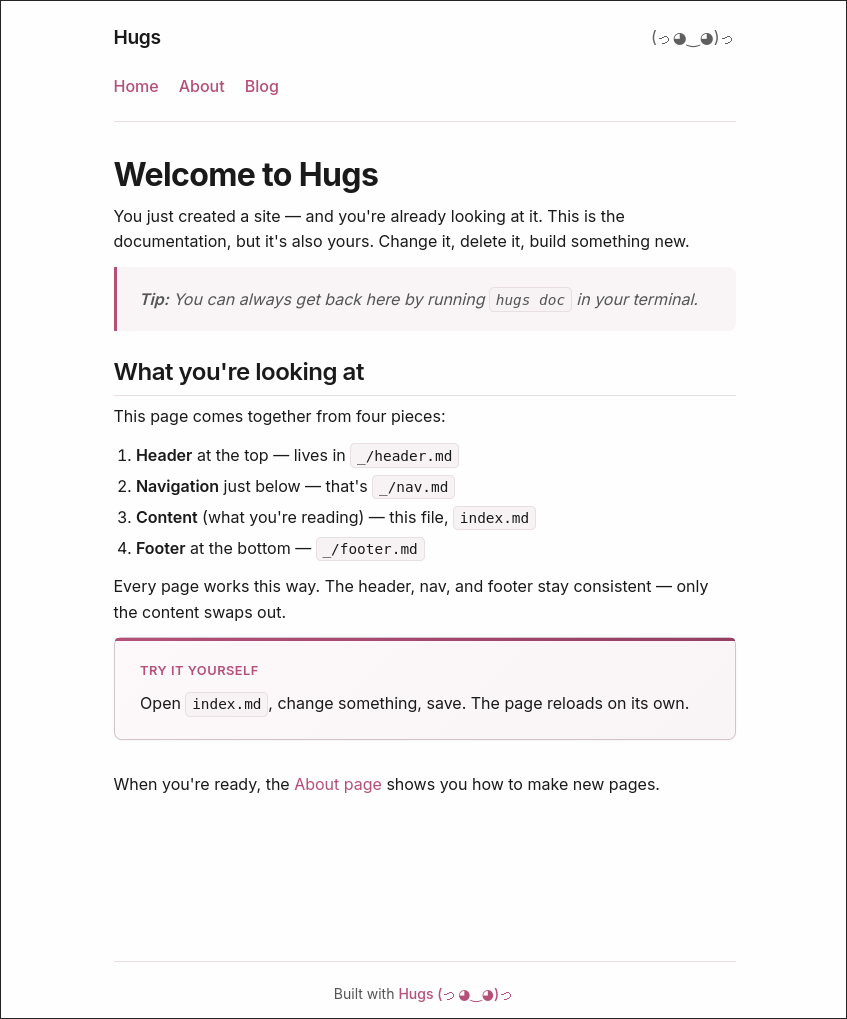
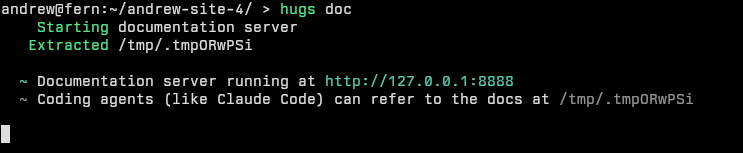
Since you will need the documentation to be present sometimes for checking out a feature or reference and also for coding agents if they drive your work, there is a hugs doc command that spins up the dev server there as well. The implementation there is actually dual purpose — the way it works is by just making a new site in a temp folder and then running a dev server in that directory to run the website. This allows for coding agents to read the reference docs as markdown as well, which is pretty neat for them to learn and navigate through stuff.
The documentation also focuses on taking the user on a journey through the features of Hugs and the site is written to showcase all of Hugs' features in a gradual manner, leading to a reference page that highlights features section-by-section. In the previous screenshot you can see the nudge - "When you're ready, the About page shows you how to make new pages." Similar nudges are present throughout to guide the user through a narrative that explains things in a gradual manner.
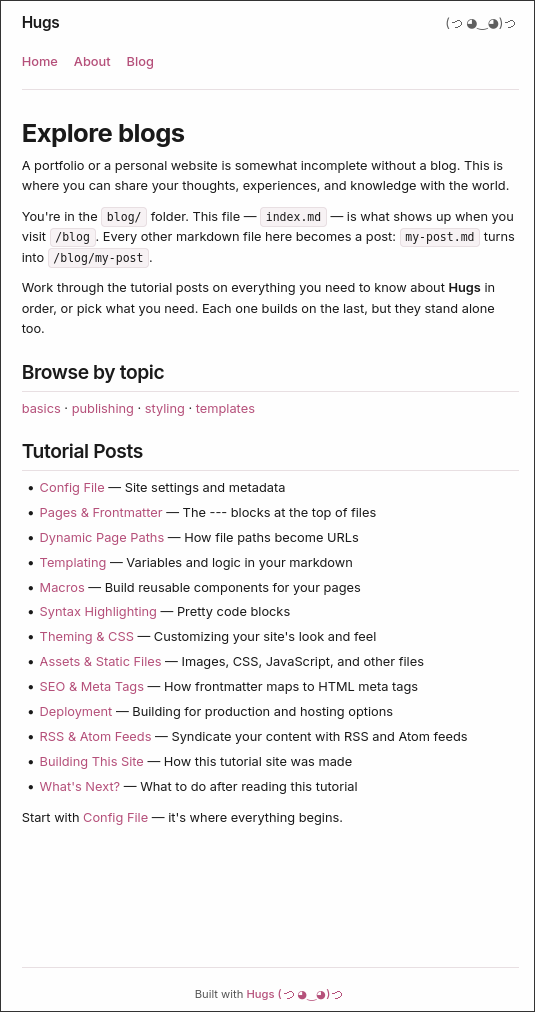
Riya contributed to the design and some of the aspects of the content in the docs site. The site was also an opportunity to flex some muscles and see how building a site feels like in Hugs. So other than the content and the rough structure, I tried to get out of the way in the docs site creation process. We also explored adding some features like Macros (ability to create simple reusable components) out of the needs felt in the site. There were some interesting tricks we used for building the site as well, which we felt was a good inspiration, and we collected them in the "Building This Site" post to clarify how that is done.
User Testing is cool!
I took it as a point to do some user testing to observe if the learning flow is seamless and iron out any places people stumble at. The observations from that are super useful! Kiran suggested the commands should always nudge the user to correctness even if the user gets it wrong, the removal of being wrong is always a net win compared to telling the user to 'git gud'. Riya's observations during the building of the docs site led to me tackling macros as a feature and similarly many insights were gathered from the testers. It is a really good way to gauge feedback and see if they can navigate through it. An oversight I had for testing was actually not giving them a goal to accomplish, giving them a fixed site to make would have made things easier, some of my testers struggled with finding a goal to achieve to warrant going through the journey; they tended to just explore the documentation and just peruse rather than apply things.
Closing notes
Hugs started out as a procrastination excuse to get out of building a site, but it has grown into a fun experience of trying to push my frontiers on building out something that is decidedly not sophisticated and somehow feels warm. LLMs have made trivial most of the things here that did create struggles on the bigger frameworks I have tried, but I still dig the endearing "purposefulness" of everything in the tool. Really an "it's not about the destination, but the journey" kind of a detour.
Hugs still has some more things to be ironed out and worked on, there are some weird quirks here and there and some assertions in the code that don't hold true in some valid cases that need to be cleared (artifact of vibe coding some of the templating related code). Riya and I will be going through them as we encounter them in our usage, but we would love your feedback as well from trying it out.
Lastly, I want to thank Dharwish, Athul, Joel, Kiran and Riya for helping me test Hugs and giving their valuable suggestions!